Saturday, March 26, 2016

Peanut Butter Eggs And Why Eggs at Easter

When I was a child, I can remember being at my Aunt's house in Pennsylvania and having her Peanut Butter Easter Eggs.  We've made them a few times. A year or so ago, my Aunt told me that she was working with the ladies in the fire house to make hundreds of them to sell in their town for a few weeks. I decided to make them this year for our family. I had a good talk with her yesterday. We talked about the variation I have of this recipe that my mom had for "Chocolate Covered Balls." That recipe is very similar, but adds coconut flakes. It calls for much more butter and no milk. So, I made half of one and half of the other. The original Peanut Butter Egg recipe is below.

I got to thinking, why do we decorate eggs at Easter?

One reason is that they are symbolic of new birth. Jesus was resurrected! We can also have new life through him. 2 Corinthians 5:17  Therefore, if anyone is in Christ, the new creation has come: The old has gone, the new is here!

Another reason that I can think of is that we've sometimes used the egg to explain the trinity. It's one egg, but has 3 parts (shell, white, yoke) just like God is one and there is the Father, Son, and Holy Spirit.


Peanut Butter Eggs
3 cups Graham Crackers crushed (I put them in a plastic bag and rolled them with a rolling pin)
1 pound confectioners sugar
1 cup Peanut butter (can use chunky if you like)
1/2 cup milk
2 Tablespoons butter (melt or soften in microwave)
(You can also add coconut flakes, about 7 oz, if you like)

Method:
Mix together with mixer or by hand. You may find you need to add more milk  (just a little) or peanut butter to taste and to make it stick together, but not too sticky. I kept it fairly dry and pressed it tightly with my hands.
Refrigerate for about an hour. Melt chocolate in microwave (I found about 30 seconds) or double boiler and dip the eggs in chocolate and chill in refrigerator.

What are some of your thoughts about Easter, Eggs, and recipes for Easter?

Tuesday, March 22, 2016

Holy Week Skit for Children

Here is a Holy Week Skit that I am leading for some children.
This should work well with a group of about 20 to 40 children.
From Matthew 21,26 through  28

Select the characters:
  • The Crowd
  • The Disciples, especially Peter and Joseph, James and John
  • Mary and Mary
  • Narrator: you can have a narrator and while they hold the microphone, you can ask them to repeat after you
  • High Priest
  • Pilate
  • 2 guards at the tomb
  • Jesus
  • Note: there can be several of some characters if you switch the actors between scenes
Props (optional):
  • Palms
  • Chalice and a loaf of bread
  • A cross
  •  A chair for the High priest
  • A chair for Pilate
  • A stone or a step for Jesus to fold his hands and put them on when he prays in the garden


Scene 1: Entry Into Jerusalem
Narrator: It was the time of the Passover. Jesus rode a donkey into Jerusalem. The crowd waved palm branches. The crowd shouted " Hosanna! Blessed is he who comes in the name of the Lord"
Crowd: wave palms, shout the words

Scene 2: Last Supper
(The disciples are seated around Jesus, eating.)
Narrator:  While they were eating, Jesus told them that one would betray him. One of his disciples would tell people where to find him and arrest him at night.
Jesus: one of you will betray me
Disciples all take turns asking: Surely, not I Lord?
Jesus: the one who has dipped his hand in the bowl with me, it is he
Judas runs off
Jesus: (passing pieces from loaf of bread to the disciples): “Take, eat; this is my body.
Jesus: (giving a cup to the disciples) “Drink from it, all of you; for this is my blood of the covenant, which is poured out for many for the forgiveness of sins."
Jesus: you will all leave me alone tonight
Peter: I will never leave you
Jesus: Before the rooster crows, three times you will tell people that you don't know me

Scene 3: The Garden
The disciples are with Jesus in the Garden
Narrator: The disciples went to the Garden with Jesus.
Jesus: “Sit here while I go over there and pray.”
(Jesus motions for James and John to (with him)
(Jesus throws himself on the ground and prays. The disciples all fall asleep)
Jesus: “My Father, if it is possible, let this cup pass from me; yet not what I want but what you want.”
(Jesus returns to the disciples and finds them all asleep)
Jesus (to the disciples) “So, could you not stay awake with me one hour?
Narrator: Almost the same thing happened 3 times
Jesus "My betrayer is here"
Judas: (coming with a crowd goes up to Jesus): "Greetings, Rabbi!” (Judas gives Jesus a kiss)
(The crowd arrests Jesus and take him to the high priest)

Scene 4: Jesus' Trial by the High Priest
(The High Priest sits in a chair with Jesus in front of him. The Crowd is gathered. Peter watches from a distance)
Narrator: Jesus was on trial.
High Priest: "Tell us if you are the Messiah, the Son of God.”
Jesus "You have said so."
High Priest: "He deserves death"

Someone in Crowd: (to Peter): "You were with Jesus"
Peter "I don't know what you're talking about"
A girl (to Peter): "this man was with Jesus"

Peter "I do not know the man"
A few people "you must be one of them, your accent sounds like them"
Peter "I do not know the man"
(The Rooster then crows)
Narrator: Peter remembered that Jesus said Peter would deny him 3 times.
(Peter goes away crying)
(a crowd brings Jesus to Pilate)

Scene 5: Jesus' Trial before Pilate
(Jesus stands before Pilate. Pilate is seated)
Pilate:  “Are you the King of the Jews?” 
Jesus : “You say so.”
Pilate: “Whom do you want me to release for you, Barabbas or Jesus who is called the Messiah?"
Crowd "Barabbas
Pilate: “Then what should I do with Jesus who is called the Messiah?”

Crowd: "Crucify him!"

Scene 6: The Cross
(Jesus can hold his hands out like he is on a cross)
Narrator: They took Jesus to be crucified. Some of his disciples and his mother were there.
(Jesus is in pain on the cross)
Jesus "it is finished"
Narrator: Jesus said those words and he died.
Narrator:  They took him down and laid him in a tomb
 (they take him to the tomb and lay him there)
Narrator: A large rock was placed over the tomb. Guards were placed at the Tomb. 

Scene 7: the Tomb
Narrator: Time passed and on the third day, Jesus arose from the dead. He was alive again!

(Jesus gets up and sits near the tomb) 
(The guards run away)

Narrator: Mary and Mary Magdalene came to the tomb, but the tomb was empty.
(Mary and Mary walk up to the tomb, they look in and see it empty and look surprised)
(an Angel walks up, Mary and Mary are surprised and afraid)
Angel “Do not be afraid; I know that you are looking for Jesus who was crucified. He is not here; for he has been raised"
(The women turn to go tell the disciples and see Jesus, again they are surprised and afraid)
Jesus :“Do not be afraid; go and tell my brothers to go to Galilee; there they will see me.”
Narrator: The disciples did as Jesus said. They want to Galilee. Jesus appeared to them there.
Jesus (as you ask the Jesus actor to repeat this, break it into parts):
“All authority in heaven and on earth has been given to me. 
Go therefore and make disciples of all nations, 
baptizing them in the name of the Father and of the Son and of the Holy Spirit, 
and teaching them to obey everything that I have commanded you. 
And remember, 
I am with you always, to the end of the age."

Finish up with a worship song

Monday, February 29, 2016

My Presentation Slides from IBM InterConnect: IoT Device on IBM Bluemix


 Above is a photo of my "Ask Me Anything" Session at the Dev@interconnect Session. Photo credits to IBMer Brian Bryson.

And, here are the slides from my presentation at IBM InterConnect:

IND-2119: A Primer to Programming an Internet of Things Device on IBM Bluemix
Download Presentation


    In this session, attendees will learn the basics of developing an Internet of Things (IoT) sensor using IBM Bluemix. I've been working on an IoT Smart Temperature Sensor project on my own time. I used to be a developer and moved into Project Management years ago. After being challenged in a presentation to learn Bluemix, I jumped right in. So, in this session, you'll learn from a newbie how to go from start to finish. You'll see how to setup some IoT device hardware, how to register it with the IBM Watson IoT Platform, how MQTT works, and how to program using Node-RED in IBM Bluemix. JSON format will also be covered.

You can read more about my thoughts on the session in my recent "My Second Day at IBM InterConnect" post here in my blog

Here's the link to the slides in case the link above doesn't work for you.
https://www-304.ibm.com/events/tools/interconnect/2016ems/REST/presentations/PDF/InterConnect2016_2119.pdf

Thursday, February 25, 2016

My Fourth Day at IBM InterConnect

I just found out that I somehow lost my post on the 2nd day of interconnect, I'll have to figure out how to reconstruct it. I'll try to repost it next week.

I had breakfast with some folks from the IBM Academy of Technology. I sat with Lisa Seacat DeLuca. She is an amazing person. She is the most prolific woman inventor in IBM!  She has two sets of twins.  How does she do it?!


I went to a talk about Local Motors and the 3d Printed connected car. Yes, the car is printed with a 3D printer!


I saw Grady Booch do a session. If you google him, you'll see that he's a classic in IT.


There was the ability to get a professional portrait taken (for use for my IBM internal photo and on external social channels), so I stood in line for that.  They had a team of 5 people working on this: Makeup, computer, photographer, coordinator, and the assistant photographer (who did lighting and posing).


I had my "Ask Me Anything" session which was very successful. It was mostly about showing how Node-RED works in Bluemix to connect to the Internet of things


I packaged some meals with "Stop Hunger Now"


We recorded a video with John Cohn and played Rock Paper Scissors with the Robot


I did an IoT Lab


I got my selfie taken at the dev@ area


I saw the Elton John Concert  - Amazing!


Wednesday, February 24, 2016

My Third Day at IBM InterConnect


I went to a talk by Amy Wilkinson: The Six Essential Skills for Extraordinary Leaders:
1 Find the gap : look for where something isn't addressed. She mentioned how airbnb was founded by some folks who had a conference and hotels were full, so they had air mattresses at people's homes. They had to re-launch several times. They were an overnight 7 year success. It took lots of years and tries.
2 Drive for daylight
3 Fly the OODA loop (see picture below)
PayPal came along with eBay, 12 PayPal folks came out as the next wave with YouTube, Yelp and LinkedIn as well as others.
When they saw certain things becoming popular, they dive into them. Yelp was a referral service, but when they saw people writing reviews, they jumped on that. YouTube was online dating. When someone took a video of an elephant and it went viral, they jumped in it.
4 Fail Wisely
5 Network Minds
6 Gift small goods
I saw the Power Servers that we use at work (and I also saw and IBM Z mainframe, it has pipes in it because it's cooled by water!)


 I was able to see a presentation given by one of my co-workers at IBM. I also saw one of my other co-workers present

 In the evening, they had old school video games there. I played Tron!


Tuesday, February 23, 2016

My Second Day at IBM InterConnect

Somehow this post was lost, so I am reposting it. I added a few links. This was about Day 2 at IBM InterConnect (Monday February 22, 2016)

My day was a busy one.  It started with a wonderful set of calls with my wife and then my daughter and grandson.

If you want to read about how my presentation went, scroll down

Interesting Kickoff to the day - My colleague misplaced his phone
My day had started with a Skype with grandson and my daughter and talking to wife.
I met my IBM colleague (Markus Van Kempen) at the lobby. We took a taxi to the convention center. When we got out were were walking to the curb and he realized he left his phone in the taxi. I immediately called it, but no answer. Fortunately I had taken a receipt from the cab and called the company and left a message. (We Could have used a new idea that I came up with when I lost my phone last year. It's filled as an IBM patent. Watch my blog for updates when I can talk about that idea when it's public.)
He tracked the taxi with his tablet and eventually the driver called and brought it back.

Opening Session
The opening session was amazing! (you can watch it here). There was breakfast to bring to our seats in an enourmous stadium. There was a live band and so many people! There was a section in the stand for media (I suppose mostly press and bloggers). It started with 3 clients talking. We were able to hear some new announcements from IBM!  Key points:
  • Disrupt of be disrupted
  • VMware partnership announced
  • New bluemix apps announced
  • Open wisk available in partnership with Apple
  • Apple has 1.5 million apps, 100 billion downloads,11m devs, 1 billion devices connected
  • Xcode is Apple's Dev environment
  • A humorous statement "C and c++ is a bummer."Apple created Swift to make it easier
  • Fastest programming language adoption than they've ever seen
  • Used with LinkedIn, Disney app, 
  • IBM is largest developer (over 100 mobile first apps)
  • Third parties have shown that Swift is as fast as c++
  • it's Safe: it designs out common programming errors
  • Apple wanted it to be fun too! Swift playground shows live simulation results live on screen.
  • Robert LeBlanc from IBM says "let the cloud work for you!" That sounds good to me!
It took 35 minutes to go between the MGM and Mandalay Bay convention centers! Here's a photo of the crowd lined up for shuttle busses:


Learning from other presenters:
I attended a session were it was so difficult to see slides due to the colors used
Amazing Lunch
I hurried through lunch. The place was amazing in size with so many tables for lunch. There were waiters all lined up, dozens of them, directing us to dozens of buffet tables set up with surrounding tables. It was like parking lot attendees at a big concert. I didn't get a photo, but it if happens again,  you have to see this.
Here's a photo of the room with all the tables. The food was very good.

Sessions Full 
I hurried through lunch to get to a noon bluemix session given by an IBM executive 3 levels above me. The session was full. I tried another one on blockchain next door that I wanted to go to as a second pick and it too was full. Here's a photo with the signs saying we couldn't get it.  boo

Changing my badge to see Elton John
I went downstairs and found out that I could change my badge to have my "icon" changed to a piano to see Elton John on Wednesday night. I ended up being about the 20th person on line. They were going to start the changes at 1pm and it wasn't clear how many seats were available. In minutes, the line had more than 100 people. I was talking to folks around me and asking people working at the desk if I might be able to get my ticket changed and get upstairs to speak by 1:15pm (I was supposed to arrive 15 minutes early to get microphone and computer connected). They started right at 1pm. There were people in line that graciously invited me to go ahead of them because I needed to speak. I gave them my business card and asked them to email me to let me know for sure that they got their tickets switched over too. I wanted to know that all of those who let me go ahead got in too!  They said, "don't worry, if we don't get in we'll all show up at your session and let you know!"  LOL
Here's a picture of the my badge with the treasured piano on it and a poster I saw!
Yes!


My Presentation
I spoke at a breakout session on the topic of connecting a Internet of Things device to IBM Bluemix. My Slides are here.
My presentation went really well! I'm estimating maybe a few hundred people, but I have to get a count later. There were very few seats open and a bunch of people standing. They laughed at my humor and especially my repeated phrase "It's so easy that even a Project Manager (like me) can do it!"
The audio stopped working during the presentation but I asked if I spoke louder if the people in the back could hear and they did, so I continued on (they fixed the audio later).
I had several questions and people came up afterwards and talked for a while.  
I had several people coming up to me during the day and thanking me. Two people actually saw me at other areas of the show and called out my name and came up to me and thanked me. One IBMer told me that it was not only informative, but also entertaining. He said it was the best presentation he had heard at InterConnect!
Here's a link to a picture tweeted by one of my fellow IBMers (who helped answer questions when I was working on the IoT Sensor I presented about). 

 Later Session
At 3pm, I went to a big Cognitive IoT session. Harriett Green (IBM ) had a race car driver come up and talk about Honda and Montecarlo racing. They spoke about using Watson to analyze data from race cars. They also had the coach of the USA Olympic cycling team which will be using Watson this summer.
Vernon Taylor IBM told us that there were 9 billion devices connected to iot last year, in 2020 there are 30 billion connected devices are expected. He talked about Zetabytes of data ( 10 to 21st power)!
Then, John Cohn got up to speak!  Wow!  He had a great explanation of Cognitive IoT and showed several examples, including his VanDeGraff generator that he connected to Watson to generate music based on Watson's social sentiment analysis for a few US Presidential candidates!
Here are some photos:
Racing:
John Cohn, IBM Fellow

His Generator
The Expo
I went to the expo center to hear my IBM friend Markus Van Kempen speak about IoT
he had a good size crowd

I spent the rest of the afternoon and evening talking to folks I met and people coming up to me about my presentation. 
Then, I took a shuttle to the Mirage and walked the Vegas Strip back to the hotel
The fountains at Bellagio
Paris

Monday, February 22, 2016

My First day at IBM Interconnect


The Trip
My day started out waking up at 2AM Vegas (PST) time (5AM EST home time).

I had a great comfortable ride to Newark airport with Humberto of MMB transportation. He was nice to talk with. It was my first time using them not only would I use them again, I'd recomed them. They serve a wide area near New York City.

Small World Story:
I sat next to an IT guy and later his wife (they switched seats) and found out that he works at the same place as my daghter and he plays guitar at the Black River Barn and Rockaway River Barn near me. I later found out that I went to school with and knew his brother pretty well. I can remember the day that his brother tragically died in an accident at school.

I watched the movie "Martian" on my phone on the place, which is is a good reminder of how fragile life is and how we all need to be looking to life hearafter. I believe in Christ and what's he's done for me to insure my future. (If you want to know more, just ask).

A laugh at the airport
Trying to find the way to the baggage claim was an adventure in itself.  Someone quickly told me that the bag I checked at the gate (the plane was full) and the bag I checked in advance was at terminal 3 carousel 19 (nothing written down anywhere to remember that, so I forgot parts of it on the way and had to re-figure it out). I had to take a train to terminal 3. I came to a big rotunda sort of area with a big video screen that said for United baggage, use the red line. On the floor was a BIG red line. I followed the red line and it took me to the train that was called the "blue line train"!  LOL Who planned that one out? I could just imagine many foreign speaking guests following the red line on the floor and getting on the wrong train.

It took me forever to walk the distance to the carousel as I was wearing a medical boot for a heel spur. By the time I got there, the baggage was already off the carousel and people were scanning with scanners (I guess assuming it was unclaimed). Boo on United for not making that all go smoother.


Confused?
The taxi driver to the hotel said that he's confused about a lot of things, including religion. I asked about religion. He was bothered that, on the day before, the Pope had said that he was not a good Christian, but Trump said he was a good Christian. I explained that Christians believe we are not good enough in God's eyes (he's perfect, we're not) and only Christ makes us perfect. I said that Trump's statement doesn't surprise me that he'd say that and that I couldn't speak for the Pope.


I checked in at the Elara Hilton Vacation Club 51st floor - wonderful view

At the Show: Colossal, Cavernous, Emense, Vast
I went to the Manalay Bay Conference Center. As tall as I am, I was immediately make to feel small in such big space. It was like I was turned into the pea between the mattresses in the story "The Princess and the Pea"!  Yet, just like the pea, I made an impression on a few people. :)
I registered, got the badge and lanyard, and went to the speaker ready room. Later on, I got lost trying to find my way back to that same room. It's just so big here.

Discover Interconnect Session
I attended a "Discover Interconnect" session (CLD-7083) about Hybrid Cloud (Don't leave me yet, I'll make this painless). I learned about what is called "Object Storage" which is huge storage that is not like file storage that we are used to on computers. Watson uses Object Storage and I hear the architects talking about it, so my ears perked up.  It was very technical; I got lost a bit there too.

I would have liked a introductory session on that tells folks how to get around Interconnect. There's so much going on all over. And, I would like some introductory sessions about these technical topics.  I guess that's why I'm here. I'm presenting an introductory topic on an Internet Of Things device later today.

Information Flew By and Over my Head - lost again
I went to a Reasearch Day talk about some new programming tool called wisk. This was interesting because I had just watched a rerun of "King of Queens" where their father was not allowed to use the wisk in the kitchen. So, I tried to pay attention. My notes are sporadic. The technical matter flew by as fast as any United airplane. So, I looked at the audience. I saw a majority of the people were of Asian decent. Many of them would often hold up their cameras and take photos of what was being presented. They obviously were impressed. I was lost... again.

Speaker Coach
I went to a group session offered to me by IBM to help coach me for speaking. It was given by Kim Wilkerson. it was very helpful.

Highlight of My Day:
Our Daughter sent me a text message. My oldest grandchild (2.5 year grandson) was crying. He missed me and wanted to talk to me. I got on the phone with him. While we talked, he thought I was still flying. So, he looked up in the air to find my plane. It was near his bedtime (maybe mine too). So, we decided to skype tomorrow. I sent a few picture of myself to him, and they sent one of the most wonderful photos of him back. That's a photo of more than the usual thousands of words. That will be a keeper for me.

Mixer Time
I wanted to turn into my survey for the Discover Interconnect session and when I did, I could go into a welcome reception. Open Bar, food all around, great folks to talk to. I sat at a small table with two IBM clients (I work for IBM). They were a joy to talk to. We used our IBM Connect App to find the "game" feature. It said to scan QR barcodes. We scanned the ones on our tags around our necks and got an error. We found out that the QR barcode in the game was different than the one around our necks. Note to app designers:  use the barcodes on folks tags.  I shook the hands of these two guys. I wanted to thank them for doing business with IBM.

IoT Welcome: Meet up -I was "Found" again
I then went to the IoT Welcome event. More food, live band, open bar. I'm not in the IBM IoT group, but I talk to many of them as it's a hobby of mine. I help out with their "maker" group newsletter and IBM Connections community. I saw John Cohn (distinguished IBM Fellow - there are only a few dozen in all of IBM globally - dozens in a company of 400,000 plus people). I was able to talk to John last year for about 10 seconds as he was talking with someone else and we passed in a buffet line at a Technical Event (IBM Technical Leadership Exchange: TLE). This time we talked for a few minutes. I've been able to get to know him better over the past months. He's a wonderful person who lives life fully and connects people and projects so well. He took selfies with all of us standing around. After he left, I mentioned to the others standing in the group that John is somehow able to blog every day.  We had some good follow up conversations about IBM. One of them said he'd probably come to my session today!


I returned to the hotel and got to sleep at 9:30pm Vegas (PST) time (12:30am EST home time) and awoke at 5am Vegas time (8am EST home time).  All night long, I had this view in the "window wall" in my room. The lights never shut off in Vegas.


Thursday, February 18, 2016

Why am I, a Project Manager, Speaking at the IBM InterConnect Conference Next Week?


What am I, a Project Manager, Doing at IBM Interconnect Giving Technical Presentations?
Who would have thought this could happen?  
The story is below.

But, first, here are my two sessions:
My sessions at IBM Interconnect 2016 (Las Vegas) :
Monday Feb. 22: (1:30 PM PST) IND-2119: A Primer to Programming an Internet of Things Device on IBM Bluemix
and
Wednesday Feb. 24 (12PM (noon) to 2PM PST): Dev@ Ask Me Anything Session:  IDA-6963: Connecting Node-RED Flows to the IBM Watson IoT Platform for an IoT Device

You might be able to catch the breakout session streaming live at ibmgo.com or perhaps someone might have them on periscope. I know that a recording will be published afterwards and I'll add a link here later.

Here's the story:
I've been helping out the IBM Hello Sensor Community. They are a group of IBMers who are interested in the Internet of Things (IoT) and many of them do IoT projects. You could say that they are hobbyists or "makers."  The Internet of Things is all about "things" being connected to the internet: refrigerators, cars, wearable health monitors, etc.  And, the IoT means there is lots of data to be analyzed and interpreted!

I worked with single-board computers decades ago and saw this Hello Sensor group as a chance to learn about IoT, Sensors and the System On a Chip (SOC) boards available today (like the Arduino Uno, ESP8266, nodeMCU, and the Raspberry Pi).

Then, last year, we were all challenged by an IBM Executive at the New York Palisades IBM Technical Leadership Exchange (TLE) to learn to program in IBM Bluemix. IBM Bluemix is the cloud platform for software development.  (note: if you want to play with IoT using your phone, there are quick 3 minute demos at http://ibm.com/Iot - on the top right, click on "Explore IoT" and then scroll down to "play with our platform now")

So, with the challenge of this TLE event and the encouragement of the Hello Sensor community I put together a few projects using some of these new small computers and then decided to do something with a purpose, so I built a Smart Temperature sensor.

I recently blogged about how I learned about Bluemix, Node-RED, MQTT, JSON, IoTF, Temperature sensors, Arduino Uno and several other things while building that Smart Temperature Sensor.

Several months ago, there was a call for speakers at the IBM Interconnect Conference. I submitted a proposal to present a "Primer" (a starters guide) at IBM Interconnect and it was accepted. I needed to find funding.
An IBM Fellow (a very prestigious position: there are only a few dozen Fellows in all of IBM), put me in touch with the IBM Academy Of Technology (which I had volunteered to help earlier at the TLE) and the AoT gracefully provided funding for me to speak at the ​conference!  Thanks to everyone who supported me.

I hope to be posting more as the conference unfolds. I may be updating this post and providing new posts.

And, I also expect that I'll be tweeting from the conference (with some being links to my blog here). So, follow me on twitter:  @henrywill   (you can see my tweets there at that link without having an account).

Here's my video about my breakout session
https://www.youtube.com/watch?v=ygcF8-FmmTU 


Tuesday, February 16, 2016

The ESP8266 NodeMCU using the Arduino IDE for development (with optional MQTT and Bluemix)

I bought a NodeMCU (ESP8266) board from Aliexpress for just a few dollars.
The NodeMCU ESP8266 is cheaper than the Arduino and has more memory, includes wifi, and runs faster.


After a lot of false starts, I arrived at this process to allow development using the Arduino IDE that I'm already familiar with.

I received help from my fellow IBMer, Neil Kolban, who wrote this free eBook about the ESP8266:
http://neilkolban.com/tech/esp8266/


Most of this information is also found in the article here:
http://www.instructables.com/id/Get-Started-with-ESP8266-Using-AT-Commands-NodeMCU/?ALLSTEPS

The ebook and that article have much more information about other ESP8266 boards, so I've "boiled it down" here to what is necessary.


1. Download the latest Arduino IDE (1.6.7 or above)
https://www.arduino.cc/en/Main/Software

2. add the ESP8266 board manager to the Ardujino IDE

Start up the Arduino IDE software
go to file, preferences, additional boards manager URLs and enter
http://arduino.esp8266.com/stable/package_esp8266com_index.json
click OK
Go to Tools, board, board manager. Scroll down to the ESP8266 and on the bottom right click "install" (if there are multiple options, choose the latest)


3. Install a USB Driver for the NodeMCU.
Driver is here:
https://www.silabs.com/products/mcu/Pages/USBtoUARTBridgeVCPDrivers.aspx
I suggest you reboot after installing it.
4. Connect the NodeMCU board to PC via a cable that has USB on one end and the microUSB on the other.

5. Look in Windows Device manager to find the driver for the NodeMCU under comm ports (windows start, device manager)

6. in the Arduino IDE, select the NodeMCU board
go to tools, board, scroll down to generic 8266, and select NodeMCU 1.0 in the menu.

7. Run the Blink code
in the IDE, select  file, examples, basic, blink
change the  three places where there is a number 13 to 2
go to the menu at top and select: sketch, upload
(note: if it fails, just restart and try again or click sketch, upload again)

Further exploration:
8. Use with MQTT and IBM Bluemix IoT Foundation
download the pubsub library to talk over MQTT

https://github.com/knolleary/pubsubclient/tree/master/src
Install a program - you can google many. The examples for the pubsub library are a good start.

https://github.com/knolleary/pubsubclient/tree/master/examples/mqtt_esp8266

if you want to read this about MQTT on IBM Bluemix
https://docs.internetofthings.ibmcloud.com/devices/mqtt.html


Note: you may also find these helpful
http://www.seeedstudio.com/recipe/1107-getting-started-with-nodemcu-devkit-in-arduino-ide.html

http://www.whatimade.today/esp8266-easiest-way-to-program-so-far/

https://learn.adafruit.com/adafruit-huzzah-esp8266-breakout/using-arduino-ide

https://github.com/esp8266/Arduino#using-git-version-

Saturday, February 13, 2016

Cabin Fever Part 6: A Smart Temperature Sensor


I've completed the "Cabin Fever" Smart Temperature Sensor and it's in use!
It's working great!  Here is my previous post (part 5) on this project.

I'm even going to be presenting about it at the IBM InterConnect Conference on Feb. 22nd! I'll post more on that later, but for now my sessions at IBM Interconnect 2016 are:
Monday Feb. 22: IND-2119: A Primer to Programming an Internet of Things Device on IBM Bluemix
and
Wednesday Feb. 24: Dev@ Ask Me Anything Session:  IDA-6963: Connecting Node-RED Flows to the IBM Watson IoT Platform for an IoT Device

What I've learned:
1. Programming on the arduino and how to use libraries for onewire temperature sensor and mqtt pubsub
2. Mqtt publish and subscribe
3. JSON
4. Bluemix and IoT
5. Node-RED
6. Node.js JavaScript
7. circuits on the Arduino and one-wire

Lessons Learned:
  1. IBM IoTF quickstart does not allow publish
  2. in C++ for Arduino, be careful of an if statement doing assignment, for example: If( a=0) instead of what you meant:  if (a==0)
  3. converting C to F, use floating constants
  4. don't use pins that are already used on the arduino ethernet card
  5. trying to save memory by using a char instead of int doesn't work well
  6. strings can be difficult
  7. nodered - trying to use gmail: there are 3 points to follow to establish credentials
  8. bluemix = app runs 24X7
  9. My first reading was 185 degrees when I started up the unit. Why? I don't know, but I added a read at startup and after that all readings were good.
  10. soldering : use a fan to blow away the smoke
  11. I needed to get the updated pub/sub library
  12. questions on DW answers and stackoverflow are a great place to get help
I'll be posting soon another post about my work with an ESP8266 NodeMCU that I'm bringing to the InterConnect conference!

Wednesday, December 09, 2015

Jesus' Birth: An Inpromptu Christmas Skit for Children


I found a skit at kidssundayschool.com and used the idea for our weekly Wednesday-night kids program tonight. Thanks to Kidssundayschool.com for the ideas.

Jesus' Birth
About 15 to 20  minutes long
A skit for children from pre-school to 5th grade.

Props:
  • A baby doll
  • three boxes (fancy gift boxes or shoe boxes will do)
Notes
1. If there are multiple children who want to be specific parts, the players can be changed by scene (if four children want to be Mary, they can take turns by scene)
2. Tip: When choosing people to be parts, start with the less popular ones so maybe there won't be so many who want to be the main parts
3. This skit is structured to be done easily without much reading or preparation (this allows younger children to participate who are still learning to read), so the narrator reads the lines to the actors and has them repeat
4. I did this tonight with the children. I held the microphone and talked the children through the scenes: I told them where they should stand and I spoke their parts (off mic) and asked them to repeat (as I held the mic to them).  All the children had a part (not all speaking). For the speaking parts, I used short sentences so they could easily repeat. There was lots of improvisation and I could even ask them questions about the story as we went (and added a bit of humor too). We had about 30 children, with 3 playing Mary (they took turns).  I asked everyone (and the teachers of the various grades) to applaud the players at the end of each scene.

Parts:  (ask in this order so that there isn't too many volunteering for the main parts)
  1. Shepherds (and sheep)
  2. Angels (Leader will select Angels with lines)
  3. Roman Soldier 
  4. Inn keepers (3)
  5. Animals in the stable (one of these can be the donkey)
  6. Magi (3)
  7. Joseph
  8. Mary
  9. Leader/Narrator: it's suggested that this be an adult who leads the actors
Scene 1: Mary's home
(Mary is in her room. An angel from the angel group is selected to deliver the message)
(Angel approaches Mary and she jumps because of being surprised)
Angel: Greetings, you who are highly favored! The Lord is with you.
(Mary trembles)
Angel: Do not be afraid, Mary; you have found favor with God. You will give birth to a son, and you are to call him Jesus. He will be great and will be called the Son of the Most High. ...his kingdom will never end.
Mary: How can this be?
Angel: The Holy Spirit will come on you. The holy one to be born will be called the Son of God.
Mary: “I am the Lord’s servant, ,may your word to me be fulfilled.”

Scene 2: Joseph's home
(Joseph is in his bed, sleeping. Another angel is selected from the angel group to deliver the message)
(Angel stands over Joseph and he stirs, but remains sleeping)
Angel: Joseph son of David, do not be afraid to take Mary home as your wife, because baby in her is from the Holy Spirit.


Scene 3: Town square

Roman Soldier: Hear ye, hear ye. Caesar Augustus declares that there will be a census. Everyone will be counted and must return to their native towns. Let this be known to everyone!

Joseph:  You know, we're from the line of King David, so we must go to Bethlehem
Mary: I'm going to have a baby, this will be a difficult trip and yet, I know that the Lord will be with us.

Scene 4: Road to Bethlehem
Leader/Narrator:  It was a long trip from Nazareth to Bethlehem, especially when Mary was about to have a baby.
(Joseph and Mary and the donkey walk around the room to show they are traveling from Nazareth to Bethlehem. This is a good place to ask the audience - which is also the players - where they are going)

Scene 5:  Bethlehem

(Joseph knocks at a door to an inn)      
Innkeeper 1:I'm coming. I'm coming. Hold on.
Joseph     We have been traveling for a long time, do you have any room for us?
Innkeeper 1:I'm sorry, but there is no more room here. Try next door.
(Joseph and Mary walk over to the next inn keeper, and Joseph "knocks" at the door.)
Joseph     We have been traveling for a long time, do you have any room for us?
Innkeeper 2:I'm sorry, but there is no more room here. Try next door.
(Joseph and Mary walk over to the next inn keeper, and Joseph "knocks" at the door.)
Joseph     We have been traveling for a long time, do you have any room for us?
Innkeeper 3:I'm sorry, but there is no more room here.  But, I can see that you need a room for your wife. I have a stable out back. With the animals, it will be warm there. And, there is lots of straw to make you comfortable
     
Scene 6: Inside the stable (pick an area of the room)
(Joseph and Mary are in the stable. Animals are near and making quiet noises)
(note: we have a stable in the front of the church, so I used this opportunity to ask the children questions about the birthplace and explain what the stable was and that the manger was used to hold food for the animals)
Joseph     I know God is with us. It is much better to sleep here than outside.
Mary     Joseph, I don’t feel very well. I am really tired. I am having birth pains. I think it’s time for the baby to be born.
Joseph     Please Mary, lie down here on this nice bed I made for you. It won't be long now.
(the baby prop can be given to Mary at this point)

Scene 7 (A field nearby - pick a section of the room)
(shepherds and sheep baabaa quietly - they can have a chance to baabaa in the mic as the leader holds it for them)
Narrator:  The shepherds where watching their sheep in the fields and angels appeared
(Angels )
Angel 1: Behold! I bring goods news, of a great joy. Today, in the city of David... there is born for you a Savior...who is Christ the Lord. And this will be a sign to you...you will find a baby. The baby will be lying in a manger.
All Angels     Glory to God in the highest! And on earth peace among men with whom He is pleased.
Shepherd 1     Let’s go to Bethlehem and see what the Lord has told us about.


Shepherd 2     Let’s tell our friends and we all go. Praise God for this Good News. Come on it’s a long journey.
     
Narrator     And so the shepherds, after hearing the angels, went to see the Baby.
(ask the Shepherds to walk around the room)
(ask the 3 Magi / wise-men to come to a place away from Joseph, Mary and the baby. Give them the 3 gift boxes)
(ask the Magi to point above the stable)
    
Magi: (I only had one wise man that wanted to speak, you can split the words up among them): Look, a Star!  It must be a king being born! Let's go see!
(Wise Men/Magi walk to the stable area)
   

Scene 8: the stable
(Mary and Joseph, and the baby Jesus are still at the stable, the Magi come near)
(Wise Men/Magi place their gifts before the baby Jesus)
(the shepherds and sheep are directed to come near the stable too - remind the sheep to baabaa quietly)
Angels:     Glory to God in the Highest! And, on earth peace among men!

Shepherds: Let's tell everyone!
(here we transitioned to sing the song that the children are practicing "Go Tell It On the Mountain")
We also told the children about the symbolism of the candy cane (see the mini-booklet link just below). As they left the program for the evening to go home, some volunteers helped me give each of them two mini-booklets and a candy cane (my lovely wife had to go to 5 stores because I directed her not to buy candy canes that were made from other continents- thanks honey).

The two mini-booklets are printables: One about the Symbolism of the Candy Cane and the other about Christmas Symbols.

I'd like to hear if you used this skit (or a variation of it) at your church or Sunday school

The end

Friday, November 06, 2015

Wireless Update: One Year Later: More Than $1000 Saved Using Republic Wireless

By RepublicWireless (Own work) [Public domain], via Wikimedia Commons

I've been wanting to write a followup to my post last year on this subject. One of our friends just asked us how our cell phone carrier is going, so here's my chance to post here so everyone can see our thoughts.

If you saw my earlier post, we switched to Republic Wireless last year. It's still highly rated (see PC Magazine).

In that post, I mentioned three issues we had. The issues were all fixed soon after that post. The forth item (how they use Sprint as the cell phone carrier) is still the same as far as I know.

Here's how the service has stacked up.

Cost
The cost is low because it uses wi-fi when it's available for talk, text and data. 
We are paying $25 for unlimited talk and text and 1GB 3G cell data/month (Since I have wi-fi in so many places I go, I only use 0.5GB/month of data) for my phone and $10 for unlimited talk and text and wi-fi only data for our second phone. There is a bit of tax on top of this, about 10%. There are also new rebate plans we're considering that give a rebate for unused. Every time we have a little issue with the phones, I keep reminding myself how much I'm saving every month.  There is no contract, it's month to month.

Coverage
Coverage has been very good. We rarely have a dropped call. Only when we were way out in Pennsylvania a few weeks ago did we have to roam. Of course, we live in a densely populated area. Coverage maps are available on their website.Again, I keep reminding myself of how much money I'm saving each month.

Audio Quality
The sound quality isn't quite as good as we experienced with our last carrier (Verizon), but it's still pretty good. Again, I keep reminding myself of how much money I'm saving each month.

Customer Service
This is a bit difficult because they don't have a phone number to call. But, you use the "help" link on the website or their app on your phone and they have a community of people who usually answer your question within 5 minutes with an email. I've found them very helpful and knowledgeable.  They give very clear and concise directions. Again, I keep reminding myself of how much money I'm saving each month.

Phones
You are limited in selection to only the phones they offer. You have to pay for the phone up front, but they offer a free trial period. They are currently Motorola phones (which was acquired by Google) and they all run the android operating system.  We've found them to be pretty good phones with nice features. Maybe they're not as great as an iphone, but I keep reminding myself of how much money I'm saving every month. I have a 1st Generation Moto X, my wife has the Moto E (1st Gen). We're both happy with them.

Texting
We've had some issues with text messages being lost (not sent or not received), but that's infrequent and again, I keep reminding myself of how much money I'm saving each month.  We can send text messages

Phonebook
One aggravating issue is that you can't put in a conference call number, then a pause, then the access code. So, you have to put the access code in manually. Again, I keep reminding myself of how much money I'm saving each month.

Caveats
There is a list of publicly disclosed caveats. I suggest you read them in advance of considering them.

Alternate Wireless Phone Carrier Options
If you look at the PC Magazine article that I linked to above, you'll see some other options. We have someone in the family who is using Straight Talk. They like it. They can chose from a few major carriers and still use any phone they like.

Questions / Comments?  
Do you have any questions or comments to add?  Please let me know and I'll do my best to answer or join in the conversation. What do you think of your cell phone wireless carrier and who are they? Did you find this helpful?



Monday, November 02, 2015

Social Sharing Etiquette : Sharing Good Exciting News the Best Way!


We probably have all heard that we should be careful what we share because "anything on the internet is there forever" and there are employers that look at what you've posted to tell if you qualify for a job or not.  But, what about how to consider our friends and family with our posts?

I've noticed that people we know find lots of success by following the steps below when a big life event comes up (like a wedding engagement, or a something else to celebrate).

I thought it might be helpful to post this so that people can think through it and comment. And, for those who know me, you know I like to analyze things and put them into steps and formulas.

Before the event occurs, it's usually only known to a few people (usually two). So, how do they  get this exciting news out in a considerate way?

What I've seen people do successfully is to first tell their closest family and friends about the announcement. And, VERY IMPORTANT, they ask them not to tell anyone else or make it public until they can tell all their friends and family.

Second, they give their closest family and friends some time to tell others. And, VERY IMPORTANT, to tell those who they are sharing this exciting news with to NOT make it public until the original couple of people announce it publicly.

Then, after their closest family and friends have had a chance to tell their closest family and friends, then they announce it publicly (facebook or whatever).

And, now, everyone can join in and comment and celebrate!

Oh, what fun it is to be spreading the great exciting news!

As Christians, we like to share the best good exciting news! We know a savior who gave his life so that we can be free, so that we can have a relationship with our creator, and so that we can be part of his kingdom now and forever.  He has the lifeboat and we're all sinking.  I'm going to the one with the lifeboat. If you want to know more, let me know. I would be happy to tell you more!

Monday, September 21, 2015

Putting TV and Electronics in Their Place


Photo By Eckhard Etzold (Self-photographed) [CC BY-SA 2.0 de (http://creativecommons.org/licenses/by-sa/2.0/de/deed.en)], via Wikimedia Commons


We know families who don't have a TV in their home. When we were married and got our home, we decided to put the TV in the basement room, not in the living room.  This allows us to have a place of relaxing in the living room. And, the living room is a place for conversation. 

I mentioned this to someone recently and they thought it was great, so I thought I'd mention it in a blog post.

We've also seen the rise of electronics in our lives. Smart phones are ubiquitous. People are checking them all the time. I do that too. And, sometimes I don't check it when I should, so I missing important things.

I've been trying to live in the present and not use my smart phone while with people.

What have you done to "put TV and electronics in their place"?


Monday, September 14, 2015

Cabin Fever Part 5: MQTT and IBM Internet of Things Foundation


Note: There is more in a newer post on this topic: Part 6

In our last installment (Part 4) of this long "saga," we ran into some roadblocks with Temboo (namely that it doesn't allow enough free "calls" to it's "choreos" to support checking for email commands at a reasonable rate).  So, I "switched gears" to a new solution:  MQTT, IBM's Internet of Things Foundation, and Bluemix (Programming on the cloud).


I found this tutorial and started working though it

Build a cloud-ready temperature sensor with the Arduino Uno and the IBM IoT Foundation, Part 1: Build the circuit and set up the environment

This is a good tutorial because it takes you step by step through lots of things to learn about the hardware and the software.

Different Temperature Sensor
I have a different temperature sensor, so I had to make some changes..  I just changed the "sketch" (program) to not call the code to get temperature and humidity and I just added a little bit to the temperature every loop so it went up by 0.1 degree.

Lesson Learned: How to Add Arduino Libraries
I ran into an issue with the MQTT library. When I followed the links to download it from Github, I tried to add the library from the Arduino IDE by importing the .zip file I had downloaded. I kept getting errors that the header file was not found (pubsubclient.h). After hours of being stuck on this (in my spare time over two days), I realized that I needed to unzip the .zip file and only move the one pubsub folder into the library folder for the Arduino IDE to find it and use it.

Needed to fix a line of the Arduino Code
I also needed to fix a line in the arduino code. This line:
"messaging.quickstart.internetofthings.ibmcloud.com"
needed to be changed to
"quickstart.messaging.internetofthings.ibmcloud.com"
(you'll find this change in the comments)

I see data!
On the 2nd part of the tutorial, I was able to use the quickstart (although the screens shown in the tutorial changed a bit) and I could see the data being displayed!  Now, that was exciting!


Asking Questions about how to get it working with Node-RED

With all of this excitement of seeing my data, I then started right away on part 3 of the tutorial!  It  has several steps. The screen pictures in the tutorial were different than the current screens. I guess the screens changed a bit. Finally, when I tried to "register" the device (the Arduino), there was no such dropdown that allowed me to register the Arduino as was shown in the tutorial.  I asked by posting comments on part 2 of the tutorial and was told just to create my own device and skip putting in all the information that it asked for.

How Does MQTT Publish and Subscribe work?
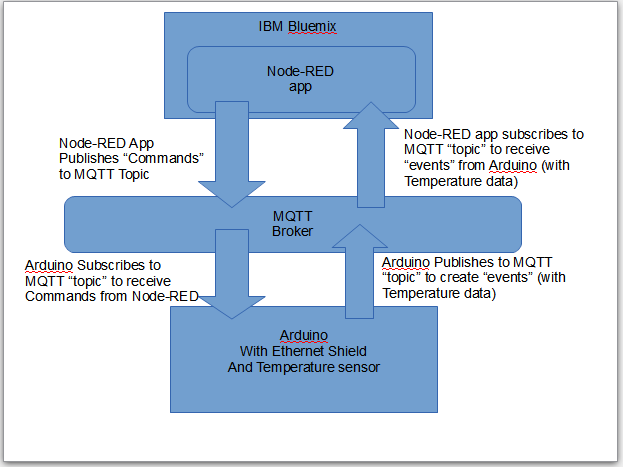
I wanted to understand more about MQTT. I got some help from the forums and they pointed me to this for an understanding of The Internet of Things Foundation (publishing events and commands). I found out from reading it that my Arduino with the Ethernet Shield and Temperature Sensor (called a "Device") will be publishing "events." I also found out that the Bluemix app (which I will program in Node-RED) will be publishing "Commands" to the Arduino "device".See the graphic above.

Learning how to use Node-RED and Bluemix:
I learned about Node-RED on Bluemix using this YouTube tutorial (be sure to read the comments for changes). I created an app following the directions there. It uses a temperature sensor simulator at:
https://quickstart.internetofthings.ibmcloud.com/iotsensor/
This was fun to play with!  I could change the temperature and watch how the Node-RED code worked.

What's Next?
 Now that I understand Node-RED a little and MQTT a little, I want to next build a simple application on the Arduino and in Node-RED that will allow me to talk in two directions.  Stay turned for part 6 of my "Cabin Fever" journey.

Monday, September 07, 2015

When You Can't Stop the Weeds, at Least Stop Them From Going to Seed


This week, I take a week off from the "Cabin Fever" project to tackle something else: Weeds.

I've been tackling an area of our yard that has a real lot of weeds. Over the past few years, I've tried mulch and stone to stop them. They are significantly diminished from the "jungle" that used to be there, but they are very persistent. I don't want to use roundup due to the health hazards and because this is near an area that drains into the storm drains and then to the river down the street. I hired a college student recently to help pull the weeds and after 4 hours, he had 6 full size trash cans filled to capacity. That worked for a while, but now, they're back!

I'm reminded of a joke I heard:
A daughter was starting out in her new marriage and was working on a flower garden. She called her mom and asked "When I'm weeding, how can I tell which are weeds and which are the flowers?" Her mom answered "pull everything up, the ones that come back are the weeds."

My new goal
So, over the past few months, I've come up with a goal:  I will prioritize pulling out any weeds that are about to go to seed. If I see the seed pods starting to form, they are the ones I pull out first. I can't keep up with pulling them all at once, but at least I can stop them from spreading.

There has to be a lesson here for life
I got to thinking; there has to be a lesson here in life. Maybe we can't tackle all of our challenges at once, but we can at least stop them from spreading.  Is there something that you've been putting off and it's only festering as a result?  Is it getting worse because you're avoiding it?  Is it spreading out into other areas, spilling over into other parts of your life or relationships?  Is it time to "pull those weeds?"

Proverbs 24:30-34 Is a also a good lesson for us. It's a different thought about weeds, take a look!

Monday, August 31, 2015

Cabin Fever Part 4: New Plans For How The Unit Will Work

In Part 3 of this "Cabin Fever" project, we were able to get a Temperature reading sent by email.

We realized that it was quite a lot of work for this little computer (technically a microcontroller) to send email. Now, we wanted it to receive emails too.

Revisiting the Original Plans
Our original plans were to:
1. Read a Temperature
2. send an email when the temperature was below some setpoint (like 32 degrees Fahrenheit which is the same as Zero degrees Centigrade, the freezing point of water).
3. Send an email every day with the past 24 temperatures that were read for each of the past 24 hours so we know that the unit is still working
4. Take a command from an email that tells the until to report temperature
5. Maybe, just maybe, also report when power failed

We have realized now that we need to simplify this a bit to allow it to fit into the small RAM memory (1K) on the Arduino Uno we are using.

New Plan
So, the new plan is as follows:
1. Read a Temperature
2. send an email (and copy the email address for the cell phone) when the temperature was below some setpoint (This will orignally be set to 40 degrees Fahrenheit because that is what was requested by the person I'm doing this for).
3. Send an email every week (and copy the email address for the cell phone) with the temperature so we know that the unit is still working
4. Take a command from an email that tells the until to report temperatures  (it will tell how often and how many times)
5. Forget about reporting when the power failed, it's just not practical at this time.

Detailed Requirements
This is what we decided when thinking about the details of the above:

1. When it starts up, it will send the temp once just to let you know it's working (and if it comes back from a power failure)
2. It will send the temp once a week just so you know it's still working
3. When it senses a temp below some setpoint (originally 40 degrees F) then it will send the temp.

It will work in 15 minute increments.
If the temp remains below the setupoint, it will send the temp every hour for the next 24 hours
Then it will send the temp only once a day.
(note: to use the email sending service on temboo that I selected, they only allow a certain number of free "calls" to their routines per month: 250, otherwise you need to pay )

Of course, if the temp goes above the setpoint, it will send one email to show the temp was above the setpoint , then it will stop sending emails again.

4. We can send an email to cause it to send some temps.
The subject of the email message must have the following characters, then it will send the temp according to the parameters:
CFRxx,yy
Where CF means "Cabin Fever" (the name I gave this project)
and
Where R means "Report"
and
where xx is the number of readings you want it sent (01 to 99)
and
where yy is a two digit number of the multiple of 15 minutes (01 to 99)
So, for example,  The following command:
CFR08,12
will cause it to send 8 temp readings that would each be 3 hours apart (12*15minutes)

5. If there is enough memory, I would also suggest we support a command to set the setpoint
CFTzz
where zz is a two digit setpoint temp in Fahrenheit

Issues with Oauth
In order to use Temboo to get gmail emails,we need to set up Oauth. You've probably seen it before, it's usually used when you allow a website to use your facebook or email login to login to some third party website. Oauth (Open Authorization) is used a lot for this. You can read more on it here on wikipedia and technical info here on the Oauth.net website.
This isn't all that complicated, there are instructions, but I ran into a problem that used up 3 to 4 hours because my temboo password had a backslash in it and that was causing issues with the temboo website. It took about a dozen emails  back and forth over 3 days with the temboo support staff to figure out that the password I had used was the issue.

New Issues with Temboo
Once I got past that obstacle, I started looking into the Temboo "choreo" that allowed me to get emails.  I realized that Temboo only allows 250 free "calls" per  month. I want the "Cabin Fever" unit to check for an email and when there is one, use the information in the email to tell the "Cabin Fever" unit how often to report temperatures.  Well, since checking for email is a "call" that counts toward the 250 free calls per month, that limits how often I can check for emails.   Using a little math:
24 hours / day X  30 days / Month  / 250 Calls /month =  2.88 hours/call.
So, we would only be able to check email every 2.88 hours. Not good.
We need a new solution.

IBM Bluemix and the Internet of Things Foundation
So, I am now looking into IBMs Internet of Things Foundation and Bluemix programming on the cloud.

An account for Bluemix is free for 30 days and I understand it's also free after that as long as you stay under certain limits.
So, I am following this tutorial and I'll be posting more info about this next.
"Build a cloud-ready temperature sensor with the Arduino Uno and the IBM IoT Foundation, Part 1: Build the circuit and set up the environment"

See part 5